Product overview
Backup Sorcery
for Autodesk Forma and BIM 360
(formerly Autodesk Construction Cloud)
Every published version of your projects, on your own storage.
From
AEC.codes
Date
October 2026
The problem
Your project history lives in Autodesk’s cloud
Today’s files are easy
Desktop Connector and the web download give you the latest version of every file.
The history is one click at a time
Any earlier version can be downloaded, but one version of one file at a time. There is no way to download every version at once.
It matters at the worst moment
A project closes, a contract ends, access to a client’s hub is about to expire: days of clicking.
Desktop Connector gives you the latest version.
Backup Sorcery gives you the history.
At public release · free
What the tool already does
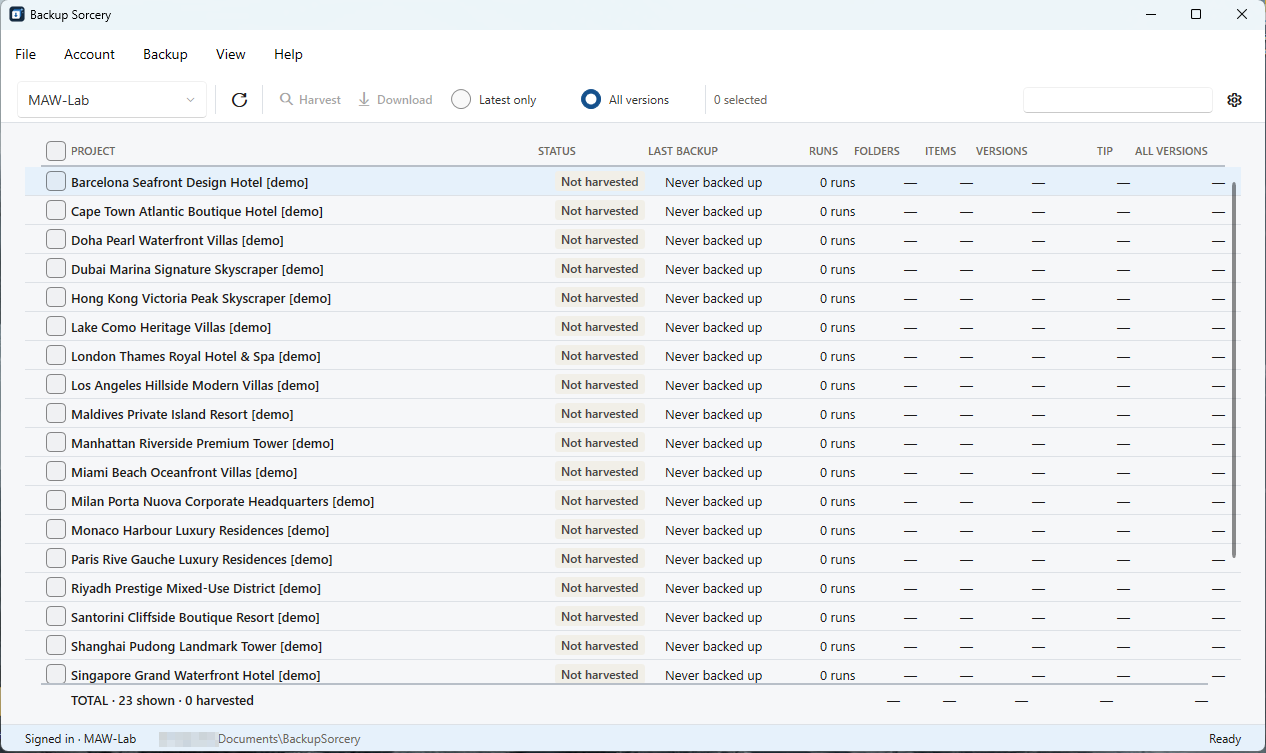
Every published version, each as its own file, in the same folder tree as the hub
SHA-256 manifest in every project folder, checkable without the app
Latest only or every version, chosen per project
The plan before the download: files, versions and weight per project
A queue of projects that runs unattended
The second run moves only what changed; a broken transfer resumes from the byte it stopped at
Revit Cloud Models: every published version of the host file
A Windows app, one installer, signed: no IT department needed
What you get on disk
A folder a person can read, a list a machine can check
One file per version, named name_vNN.ext. No database, no proprietary archive, no lock-in: any person can open the files, today or in ten years.
The manifest lists every version with its size and SHA-256 hash, plus what was skipped and why.
D:\Backups\Riverside Library\
  Project Files\
    Architecture\
      RL-ARC-Model_v01.rvt
      RL-ARC-Model_v02.rvt
      …
      RL-ARC-Model_v14.rvt
    Structure\
      RL-STR-Model_v01.rvt
  backup-sorcery-manifest.json
Names are illustrative.
Measured, not promised
Real runs on real projects
4 min
7,044 files, latest versions. A test project built on purpose from many small files, to find the limits of Autodesk’s APIs. The Forma project download of the same project took 26 minutes, on the same line.
67 min
A cloud model with 90 published versions, 19 GB: every version, unattended. Many versions are smaller and download one by one, so the average is slower than for one large file.
29 min
One 22.8 GB file, downloaded in segments. The same file took 4 h 47 min before segmented download, same line.
Measured by AEC.codes on our own connection in Europe, against a hub hosted in the US. Your times depend on your connection, on the size of your files, and on where your hub’s data is stored.
Speed is ongoing work
We push Autodesk’s APIs to their limit, on purpose
01
Find the limit
Test projects built to stress the APIs: thousands of small files, single files over 20 GB, cloud models with dozens of versions. We measure where Autodesk starts refusing calls.
02
Run just below it
The tool paces its calls on the limits we measured: as fast as Autodesk allows, without being throttled.
03
Time it against the Forma project download
Each change is timed against the download Autodesk offers for the same project, on the same line.
The tests go on: every limit we find becomes a rule in the tool, to make it as fast as is technically possible.
For your IT department
Built to be trusted
Read-only
It never changes, moves or deletes anything in your hub.
Your permissions, not more
It inherits the folder permissions of the account that signs in.
Nothing passes through us
Files go from Autodesk’s storage straight to your disk. The public build’s only call to AEC.codes is an anonymous update check.
Your own Autodesk app, your own limits
Autodesk limits how many calls each app can make to its APIs every minute. A tool that ships one client ID for every customer splits that limit among all of them: when another firm downloads a whole hub on a Saturday, everyone slows down. Backup Sorcery runs as an app your studio registers once, so the whole limit is yours, and the tool paces itself to use it up to the limit, without going past it. Your hub admin enables the app, and can switch it off.
Coming
What we are working on next
- Backup to S3-compatible storage
- Scheduled runs on your PC
- A view of the projects with no backup
- Dated copies with a retention rule
Direction, not a calendar: no dates are promised for any item.
Public beta · Free
Try it on your own projects
Back up every published version of your Forma and BIM 360 projects to a folder you own.
Windows 10 (1607 or later) and Windows 11, x64 · Signed by МАУ ЕООД