
QTOCompute Freemium
QTOCompute calculates the QTO quantities for every element in your configured categories, applying the rules you set in QTOMappings, and records the results in the project. It runs in two steps: a Preview of what will be computed, then a Results summary of what happened.
Where this fits
QTOSetup creates the QTO parameters and loads price lists. QTOMappings defines how each quantity is derived per category. QTOTag attaches priced items to elements. QTOCompute computes the quantities and writes them, so tagged items can be priced and reported in QTOReport.
Prerequisites
- QTOSetup must have run on the project.
- At least one category must be mapped in QTOMappings — otherwise QTOCompute stops with "Run QTO Mappings before using Compute."
- The model must contain elements in those mapped categories.
Quantities are computed for every element in the mapped categories, whether or not it has been tagged. Tagging (QTOTag) is what later turns those quantities into priced totals.
How to run
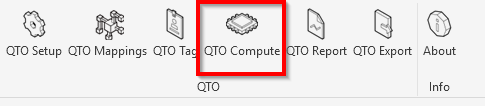
Click QTO Compute on the ribbon. It first opens a Preview of what will be computed — click Proceed to run or Cancel to back out. When the run finishes, a Results dialog summarizes it. The whole run is a single undo step in Revit.
Preview
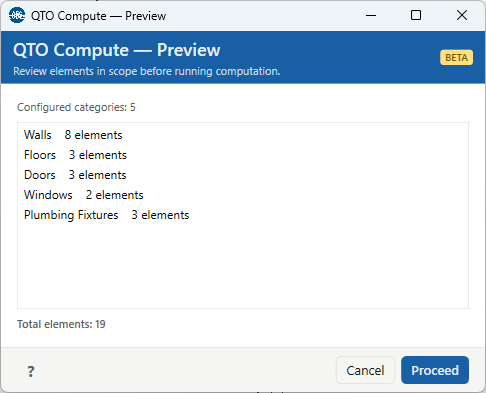
The Preview shows Configured categories (how many will be computed), a list of those categories with their element counts, and Total elements. A long list may be truncated for display, but all categories are still computed. Click Proceed to run.
Results
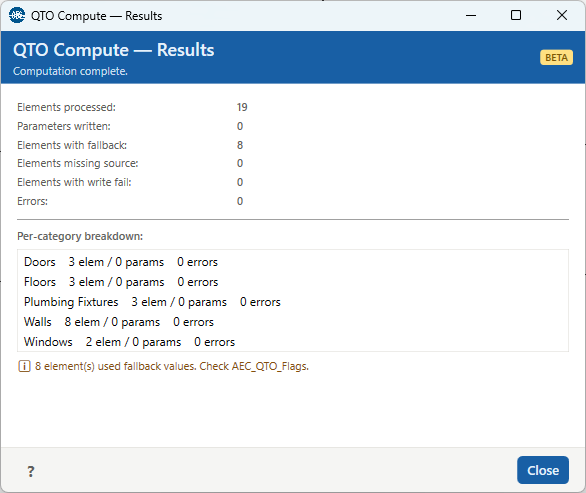
The run-level counters are:
| Counter | Meaning |
|---|---|
| Elements processed | How many elements the run computed. |
| Parameters written | How many QTO values were written into the Revit Shared Parameters. This is 0 until those parameters exist — see the note below. |
| Elements with fallback | Elements where a computed value fell back to a bounding-box dimension because its formula could not be evaluated. These are flagged in AEC_QTO_Flags. |
| Elements missing source | Elements where a direct mapping's source parameter could not be read. |
| Elements with write fail | Elements where writing a Shared Parameter failed. |
| Errors | Elements that errored during processing. |
Below the counters, a per-category breakdown lists each category as
"{Category} {N} elem / {P} params / {E} errors". If any elements errored, a warning points you to
QTOSelectIssues; if any used fallback values,
an info line reminds you to check AEC_QTO_Flags.
What QTOCompute computes
For each element, QTOCompute applies the category's rules from
QTOMappings: it reads the
direct mappings (a quantity taken from a Revit parameter) and evaluates the
computed parameters (a quantity from a formula, with a bounding-box fallback). Stairs
get a dedicated solid-volume calculation. Any fallbacks or read problems are recorded in the element's
AEC_QTO_Flags.
The computed values are always written into the project (ExtensibleStorage) — this is the source of truth in both free and paid modes. They are also written into the Revit QTO Shared Parameters when those exist, which is what makes the quantities show up in Revit schedules, tags, and IFC export. Those parameters are created by QTOSetup (a Pay feature), so until you create them, Parameters written stays at 0 even though the quantities were computed and stored.
Troubleshooting
"Run QTO Setup before using Compute."
No project configuration yet. Run QTOSetup first.
"Run QTO Mappings before using Compute."
No categories are mapped. Open QTOMappings and define at least one category's quantities.
"No elements found in configured categories."
The model has no elements in the categories you mapped. Add geometry or map the categories that are present.
Parameters written is 0
The QTO Shared Parameters haven't been created. The quantities are still computed and stored in the document; create the parameters in QTOSetup (Pay) to also write them into Revit.
Some elements used fallback values
Their formulas couldn't be evaluated, so a bounding-box dimension was used. Check AEC_QTO_Flags and review the mapping in QTOMappings.
Some elements errored
Open QTOSelectIssues to select and inspect them.